This is part 4 of the following series:

  1. Originating requirements
  2. Use cases
  3. Product requirements specification
  4. Physical architecture and interfaces (this document)

The document maps all specifications to hardware or software interfaces. To contribute more contents, identify all external interfaces and describe all properties that meets the system-level specifications: mechanical / optical / electrical / softrware. Omit all internal interfaces; those should reside in code comments or in the technical reports.

How to use this document

This document follows the Product Requirement Specifications (PRS), where the interfaces linking various sub-systems are captured.

There are also lower level internal interfaces; these are often the interfaces that are owned by a single engineer (e.g. the electrical interfaces found on a single circuit board). These lower level interfaces are not given a number and description, are not turned into requirements, and instead are captured in lower level specifications and design documentation.
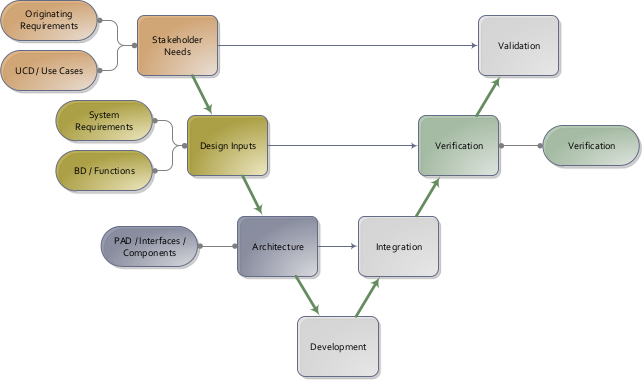
System engineering V-model. Component-level designs are captured following the system-level specifications.

Similar to defining use cases, the process of capturing the architecture via a Physical Architectual Diagram is helpful to ensure that the interfaces are identified. For particularly complicated interfaces, the descriptions above can reference a more detailed document (such as a mechanical interface drawing, electrical pinout, firmware/software communication protocol, etc.).

The Logical Architecture Diagram (LAD) groups the functions into sub-systems. Flows among functions are mapped to Interfaces, featuring interactions among sub-systems. The LAD is in turn implemented by physical components in the Physical Architecture Diagram (PAD). The PAD links all external interfaces with the corresponding internal components of the system.
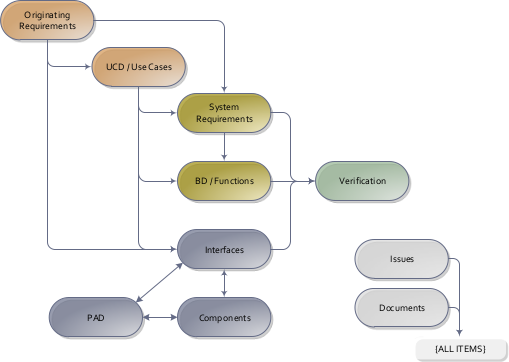
Interface specifications are traced back to the Originating Requirements, and are verified by the Verification Plans. The Physical Architecture Diagram (PAD) links all external interfaces with the corresponding internal components of the system.

Logical architecture

lad-1: Clock radio logical context

Top-level logical context for a radio receiver alarm clock.
UserClock RadioRadio Transmitter[int-1] Alarm time input[int-2] Audio output[int-3] Radio channel input
Component diagram "lad-1: Clock radio logical context"

int-1: Alarm time input

The user enters the alarm time and enables or disables the alarm.

Satisfies:

  • [sys-3] Accept alarm settings:The clock radio SHALL accept alarm time and alarm on or off settings from the user and derive current alarm time and alarm activation data for alarm management.

Software / firmware descriptions

  • The interface SHALL accept alarm time and alarm enable input from the user.

int-2: Audio output

The clock radio provides audible output to the user.

Satisfies:

  • [sys-8] Broadcast radio sound:The clock radio SHALL broadcast radio sound to the user from radio signals, alarm input, activation, and volume level.

Software / firmware descriptions

  • The interface SHALL provide audible radio or alarm output perceived by the user.

int-3: Radio channel input

The external transmitter provides a radio channel to the clock radio receiver.

Satisfies:

  • [sys-7] Decode radio waves:The clock radio SHALL receive radio waves from the external transmitter and decode them into radio signals using the current frequency setting.

Software / firmware descriptions

  • The interface SHALL convey received radio-frequency signal from the external transmitter into the receiver path.

lad-2: Clock radio logical internals

Simplified logical architecture for the receiver alarm clock.
ClockAlarm ControllerRadio DemodulatorSpeaker[int-4] Clock signal[int-5] Alarm signal[int-6] Audio signal
Component diagram "lad-2: Clock radio logical internals"

int-4: Clock signal

The clock provides timing information to the alarm controller.

Satisfies:

  • [sys-4] Trigger alarm in automatic mode:The clock radio SHALL trigger an alarm when the current time equals the configured alarm time while the system is in `Radio AUTO` mode.

Software / firmware descriptions

  • The interface SHALL communicate current time needed to compare against the configured alarm time.

int-5: Alarm signal

The alarm controller provides an alarm trigger to the speaker path.

Satisfies:

  • [sys-4] Trigger alarm in automatic mode:The clock radio SHALL trigger an alarm when the current time equals the configured alarm time while the system is in `Radio AUTO` mode.
  • [sys-5] Limit automatic ringing duration:In `Radio AUTO` mode, the ringing state SHALL return to silent after an alarm timeout of 59 minutes.
  • [sys-8] Broadcast radio sound:The clock radio SHALL broadcast radio sound to the user from radio signals, alarm input, activation, and volume level.

Software / firmware descriptions

  • The interface SHALL communicate alarm activation to the audio output path when alarm conditions are met.

int-6: Audio signal

The radio demodulator provides decoded audio to the speaker path.

Satisfies:

  • [sys-7] Decode radio waves:The clock radio SHALL receive radio waves from the external transmitter and decode them into radio signals using the current frequency setting.
  • [sys-8] Broadcast radio sound:The clock radio SHALL broadcast radio sound to the user from radio signals, alarm input, activation, and volume level.

Software / firmware descriptions

  • The interface SHALL communicate decoded radio audio from the radio demodulator to the speaker path.

Physical architecture

pad-1: Audio physical view

Physical audio path showing how alarm and radio audio drive the speaker.
Alarm ControllerRadio DemodulatorAudio AmplifierSpeaker[phy-4] Alarm wire[phy-6] Audio wire[phy-7] Speaker wire
Component diagram "pad-1: Audio physical view"

phy-4: Alarm wire

A wire carries alarm trigger output from the alarm controller to the audio path.

Satisfies:

  • [int-5] Alarm signal:The alarm controller provides an alarm trigger to the speaker path.

Electrical descriptions

  • The alarm wire SHALL enable the audio path when alarm conditions are met.

phy-6: Audio wire

A wire carries decoded audio signal from the radio demodulator to the audio amplifier.

Satisfies:

  • [int-6] Audio signal:The radio demodulator provides decoded audio to the speaker path.

Electrical descriptions

  • The analog audio wire SHALL carry demodulated audio from the receiver stage to the amplifier stage.

phy-7: Speaker wire

A wire carries amplified audio from the audio amplifier to the speaker.

Satisfies:

  • [int-2] Audio output:The clock radio provides audible output to the user.

Mechanical description

  • The speaker SHALL be mounted to radiate audible sound from the enclosure.

Electrical descriptions

  • The speaker wire SHALL carry amplified audio current from the amplifier to the speaker.

pad-2: RF physical view

Physical RF path showing broadcast reception from the external transmitter into the receiver hardware.
Radio TransmitterAntennaRadio Demodulator[phy-2] Antenna[phy-5] RF wire
Component diagram "pad-2: RF physical view"

phy-2: Antenna

The antenna receives the external radio broadcast.

Satisfies:

  • [int-3] Radio channel input:The external transmitter provides a radio channel to the clock radio receiver.

Electrical descriptions

  • The RF path SHALL convey received broadcast energy from the antenna into the receiver circuit.

phy-5: RF wire

The antenna feeds RF signal into the radio demodulator.

Satisfies:

  • [int-3] Radio channel input:The external transmitter provides a radio channel to the clock radio receiver.

Electrical descriptions

  • The RF path SHALL couple the received broadcast signal from the antenna into the demodulator circuitry.

pad-3: Timing physical view

Physical timing path showing alarm entry and time comparison hardware.
UserAlarm ButtonsReal-Time ClockAlarm Controller[phy-1] Alarm buttons[phy-3] Clock wire
Component diagram "pad-3: Timing physical view"

phy-1: Alarm buttons

The user presses physical buttons to set or enable the alarm.

Satisfies:

  • [int-1] Alarm time input:The user enters the alarm time and enables or disables the alarm.

Mechanical description

  • The alarm buttons SHALL be accessible from the front panel.

Electrical descriptions

  • The button contacts SHALL convey alarm-setting input into the control electronics.

phy-3: Clock wire

A wire carries timing data from the real-time clock to the alarm controller.

Satisfies:

  • [int-4] Clock signal:The clock provides timing information to the alarm controller.

Electrical descriptions

  • The timing wire SHALL carry current time data from the clock circuit to the alarm controller.