The document captures the high-level use cases requested by the stakeholders.
To contribute more contents, review and trace each item back to the Originating requirements.
Then, elaborate further in the system-level specifications.
How to use this document
The document captures missing stakeholder requirements,
adds additional detail, and as a precursor to capturing engineering level requirements.
Well thought out use cases allow engineering level specifications,
especially functional behavior of the syste, to be created more efficiently.
The document also help identify various requirements categories that need to be detailed.
This document is shared with the stakeholders to gain alignment prior to further requirements definition
and analysis.
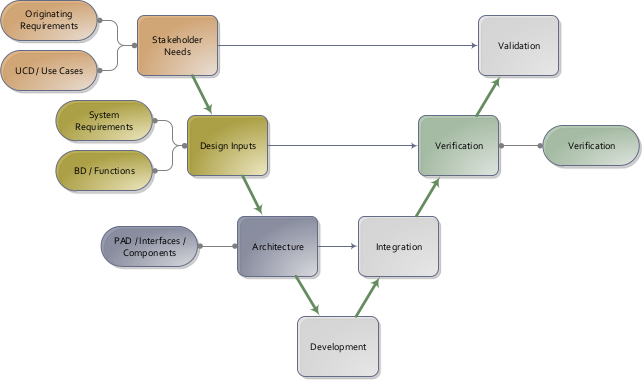
System engineering V-model.
Use cases helps capture missing high-level requirements.
ucd-1: Trigger an alarm
The clock radio wakes the user at the configured alarm time.
Use case diagram "ucd-1: Trigger an alarm"
Pre-conditions
The current time is available, alarm settings are configured, and the clock radio is powered.
Main event flow
The user enables the alarm and sets an alarm time.
The user selects the radio operating mode and optionally sets radio frequency and volume.
The clock maintains the current timestamp.
When the current time matches the configured alarm time in automatic mode, the alarm manager triggers the alarm.
The radio broadcasts audio output to the user.
Post-conditions
The user is alerted by the clock radio at the requested time.
Alternate flow
If the alarm is disabled, the radio mode is not automatic, the alarm time is not reached, or radio audio is unavailable, the user is not woken by radio playback.
Linked requirements
[org-1] Wake up with alarm:
The user SHALL be able to configure the clock radio to wake them up at the intended alarm time.
[org-4] Support radio modes:
The clock radio SHALL support explicit radio operating modes so the user can keep radio playback on, off, or automatically driven by the alarm.
[sys-3] Accept alarm settings:The clock radio SHALL accept alarm time and alarm on or off settings from the user and derive current alarm time and alarm activation data for alarm management.
[sys-1] Timestamp data type:The clock radio SHALL represent time as a timestamp containing an hour in the range 0 to 23 and a minute in the range 0 to 59.
[sys-4] Trigger alarm in automatic mode:The clock radio SHALL trigger an alarm when the current time equals the configured alarm time while the system is in `Radio AUTO` mode.
[sys-5] Limit automatic ringing duration:In `Radio AUTO` mode, the ringing state SHALL return to silent after an alarm timeout of 59 minutes.
[sys-8] Broadcast radio sound:The clock radio SHALL broadcast radio sound to the user from radio signals, alarm input, activation, and volume level.
[sys-9] Support radio operating modes:The clock radio SHALL support the operating modes `Radio OFF`, `Radio ON`, and `Radio AUTO`, with transitions triggered by the `radio off`, `radio on`, and `radio auto` events.
[sys-6] Accept radio settings:The clock radio SHALL accept radio on or off mode selection, frequency, and volume settings from the user and derive activation, current frequency, and volume level data for radio playback.
ucd-2: Get time
The user sets or reads the current time from the clock radio.
Use case diagram "ucd-2: Get time"
Pre-conditions
The clock radio is powered and the display function is available.
Main event flow
The user sets the current time.
The clock function updates the internal timestamp.
The display function presents the timestamp to the user.
Post-conditions
The clock radio shows the current time to the user.
Alternate flow
If the current time is not set, the displayed time may be incorrect.
Linked requirements
[org-2] Read current time:
The user SHALL be able to set the current time and read the displayed time from the clock radio.
[sys-2] Maintain current time and display:The clock radio SHALL accept current time input, maintain the current timestamp, and provide a timestamp display to the user.
[sys-1] Timestamp data type:The clock radio SHALL represent time as a timestamp containing an hour in the range 0 to 23 and a minute in the range 0 to 59.
ucd-3: Get news
The user configures the radio and listens to received radio audio.
Use case diagram "ucd-3: Get news"
Pre-conditions
The radio transmitter emits radio waves and the clock radio is powered.
Main event flow
The user sets radio mode, frequency, and volume.
The radio subsystem receives and decodes radio waves.
The radio subsystem broadcasts radio sound to the user.
Post-conditions
The user hears radio audio at the configured settings.
Alternate flow
If no usable radio signal is received, radio sound is unavailable to the user.
Linked requirements
[org-3] Get news by radio:
The user SHALL be able to configure radio playback and listen to radio audio from an external transmitter.
[org-4] Support radio modes:
The clock radio SHALL support explicit radio operating modes so the user can keep radio playback on, off, or automatically driven by the alarm.
[sys-7] Decode radio waves:The clock radio SHALL receive radio waves from the external transmitter and decode them into radio signals using the current frequency setting.
[sys-8] Broadcast radio sound:The clock radio SHALL broadcast radio sound to the user from radio signals, alarm input, activation, and volume level.
[sys-9] Support radio operating modes:The clock radio SHALL support the operating modes `Radio OFF`, `Radio ON`, and `Radio AUTO`, with transitions triggered by the `radio off`, `radio on`, and `radio auto` events.
[sys-6] Accept radio settings:The clock radio SHALL accept radio on or off mode selection, frequency, and volume settings from the user and derive activation, current frequency, and volume level data for radio playback.